


 |
 |
 |
 |
 |
|
 |
 |
Part 3 - Using Quantrac 2005
-
3
-
The Toolbar
Access often-used functions quickly
The toolbar allows you to access certain Quantrac 2005 functions at any time. For example, if you are adding a
service call and would like to access the Installation Scheduler without closing the service call, you can simply click the
Installation Scheduler button on the toolbar. Once you have closed the Installation Scheduler, the service call will
reappear.
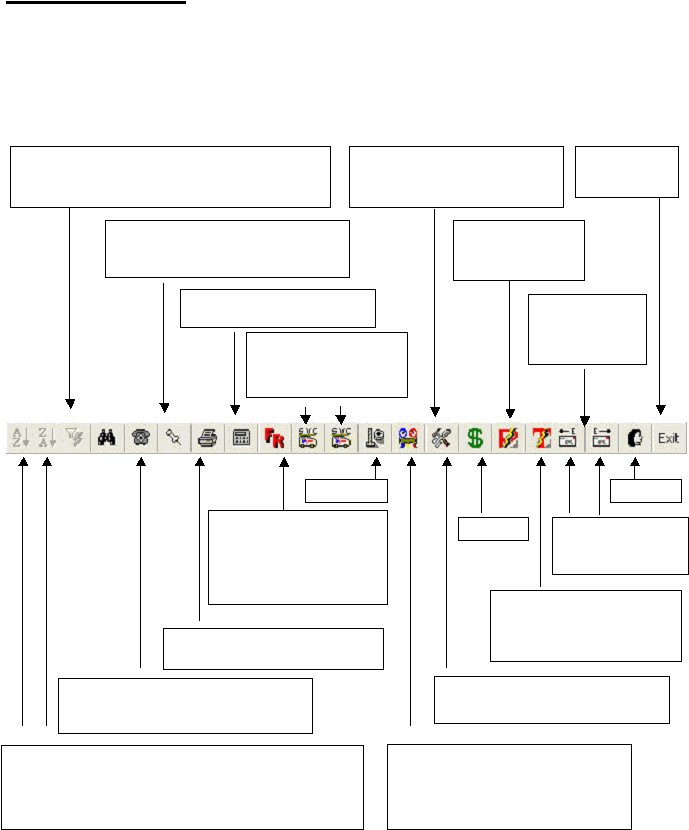
List Sorting: Sort a displayed list either Alphabetically or
reverse Alphabetically. For these buttons to work you must have
a list (i.e. service calls) on the screen. Click your cursor in the
column you wish to sort, first, and then click the toolbar button.
Filter: Filter a list of items. Simply click in the column
that may contain the text. Then, click this button and
follow the directions.
Quantrac 2005 Directory: Quickly locate
often-used telephone numbers, companies,
friends, etc.
Diary: Keep a diary of significant events
in your business. Entries are automatically
time and date stamped.
Reports: Click this button to access
the many management reports.
Microsoft Calculator: Access the
calculator with this button.
Flat Rate Pricing: If you
subscribe to Callahan Roach
or Profit Strategies Flat Rate
pricing, you can view your
company’s pricing by clicking
this button.
Service Schedulers:
Service Dispatching
schedulers are available
via these buttons.
Nuts and Bolts: View your customized
parts pricing and print pricing labels with
bar codes. Also, access your company’s
parts inventory procedures, Purchase
Orders, and reporting.
Service Calls: View and access lists
of Assigned, Unassigned, Hold, and
Unscheduled service calls.
Installations: Access your customized
tabular lists of open installations.
Paging and Text Messaging:
Access the Alpha and Numeric
electronic paging functions of
Quantrac 2005.
Messaging: View
Sent, Received,
and Archived
office messages.
Messaging: Create
and send Quantrac
2005 messages.
Exit Quantrac
2005.
Receipts: Open the
Receipts processing
functions.
Personnel
Invoice Items
Receipts
|
 |
|