


 |
 |
 |
 |
 |
|
 |
 |
-
28 Part 3 - Using Quantrac 2005
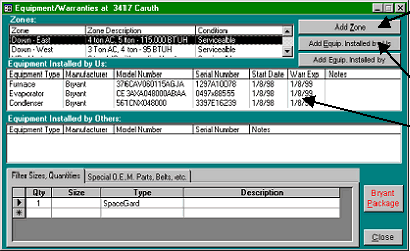
Notice that the jobsite form contains a list of equipment installed at the jobsite. Here, all equipment installed is by your
company (us). The list will also contain equipment installed by others if recorded for this jobsite.
Note: If any of this equipment is still under
your warranty, the Warranty button legend
characters will be red.
Notice that there is a “Filters” button, which in
this example is red. This denote that you have
specific filter sizes and descriptions recorded for
this jobsite. Click this button the view the list of
filters.
To access the Zones and Equipment form, click
the Equip button on either the Jobsite, Service
Call, or Installation form. (Jobsite form shown
here)
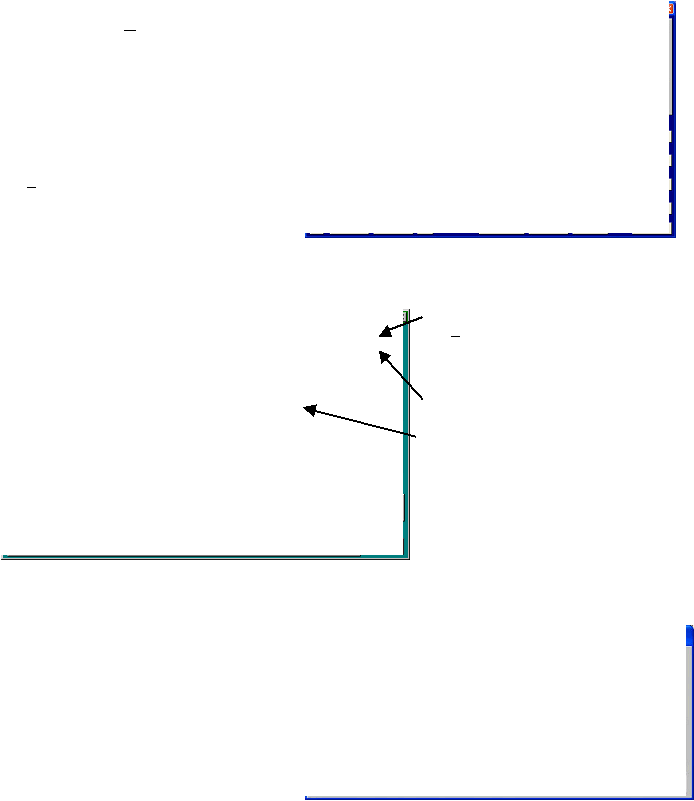
This is the Equipment form for the address of the
jobsite in the above example. Notice that there are currently several equipment zones recorded for this jobsite.
(Down-East, Down-West, etc.) A short description of each zone is shown, and the condition of the equipment
(replacement recommended or Serviceable) is shown.
To add a new zone to the jobsite, click the
Add Zone button.
To add equipment by your company (or
previously installed equipment by some other
company) click the appropriate button
To obtain the equipment detail form, double-
click on the desired equipment line in this box.
You may record an infinite list of filters for
any zone. The filters listed here are for the
Down-East zone (which is highlighted in the
top window). To access the list of equipment
or filters for the other zones, click the cursor
on the desired line in the Zones box.
You may also record any special components (drive belts, humidifier nozzles, special O.E.M. parts, etc. for equipment
within a zone. The data entry and retrieval is similar to the Filter data, as explained above.
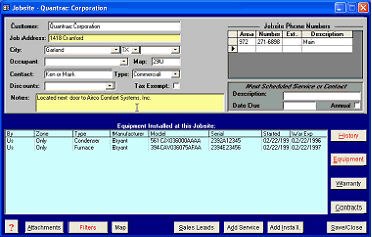
When you add a new equipment zone, you’ll be
presented with this form. Choose the zone name
from the drop-down list or enter a new zone that
is not in the list. Enter a basic description of the
system equipment. The equipment evaluation it
utilized in reporting where you may use the data
to initiate sales processes.
By double-clicking in the Zone, Zone Description,
or Condition fields, the user can add or edit
|
 |
|