


 |
 |
 |
 |
 |
|
 |
 |
-
26 Part 3 - Using Quantrac 2005
The Installation Scheduler
The optional Installation Scheduler is one of Quantrac 2005’s unique features. It is designed to help you
schedule/dispatch your installation calls in the most efficient manner possible. It even tells you the current location of
dispatched installation employees and allows you to pre-assign installation calls to mechanics. To further facilitate
scheduling, it enables you to sort your installation calls by date/time due, employee, or map-grid location. You can
access the Installation Scheduler at any time by clicking the Installation Scheduler button on the toolbar. If, for
example, you are entering a Sales Lead and a customer phones to see if you can make an installation call at a particular
time, you can simply click the Installation Scheduler button on the toolbar. Once you have closed the Installation
Scheduler, the sales lead will reappear.
Opening the Installation Scheduler
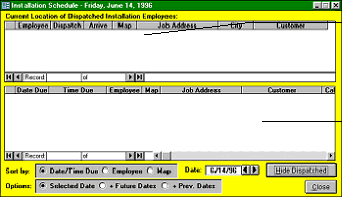
Click the Installation Scheduler button on the toolbar to display the following form
1
.
Your Installation Department’s goal each day is to empty the bottom window of the form.
To change the date in the “Date” field, (1) click the arrows to the right of the field; or (2) double-click in the field
and then double-click on the desired date.
To re-sort the installation calls in the bottom section of the form, click the desired button in the “Sort by” field.
By clicking the desired button in the “Options” field, you will see a list of installation calls due on the selected date
(“Selected Date”); due on the selected date and in the future (“+ Future Dates”); or due on the selected date and
previously (“+ Prev. Dates”). We suggest that you regularly select “+ Prev. Dates” so that you are sure to see
any installation calls that were not completed on earlier days.
1
When you access this form, it will show either (a) one section containing a list of installation calls due; or (b) two sections, the
bottom containing a list of installation calls due and the top containing a list of installation calls dispatched. To switch between
these formats, click the “Hide Dispatched/Show Dispatched” button on your screen.
The bottom section contains a list of
installation calls due. This list can
be sorted by date/time due,
employee or map-grid location. To
display an installation call for
viewing or editing, double-click on
the desired line.
The top section contains a list of
installation calls dispatched. To
display an installation call for
viewing or editing, double-click on
the desired line.
|
 |
|