


 |
 |
 |
 |
 |
|
 |
 |


Part 2 – System Customization - 7 -
Entering Call/Invoice Types
Quantrac 2005 provides for three separate types of invoices, “Service”, “Installation”, and “Customer”. Each of
these produces a slightly different style of invoice for your customer. For instance, a Service invoice employs the
Symptom, Diagnosis, and Repair from the parent Service Call, followed by a list of line items for the individual
parts, services, or flat rates. An Installation Invoice is created from an Installation, and contains an area for free-
form text, to describe the charges of the invoice and line items. A Customer invoice is created from the customer
form…and contains a free-form text area and a line item area.
Each of these major invoice types can be created from any number of “Calltypes”. For instance, a Service invoice
can originate from an Emergency call, Check-up call, Evaluation call, etc.
In this section, you will be able to list the sub-types of invoices for each of the three invoice types.
IMPORTANT: If you have purchased the Quantrac 2005 Accounts Receivable module or Quantrac 2005 Professional (which
includes the AR module) your setup form will include the general ledger account numbers associated with each calltype. You
must enter the GL acct number for each calltype for AR to work properly . See Accounting Setup in section six for more
details.
Click “Setup|Call/Invoice Types” on the menu bar.
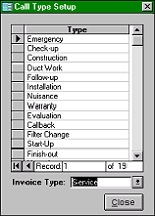
If you do not have Quantrac 2005 Accounts Receivable, this form will appear.
The displayed form lists the types of calls that you make (Normal, Emergency,
Nuisance, etc.) for each type of invoice (Service, Installation, Customer). Whenever
you add a new service or installation call, or create a customer (counter or office
sale) invoice, you will select the type of call and/or invoice type from this setup list.
1.
Select the Invoice Type from the list (Service, Installation, Customer).
2.
Scroll to the bottom of the list of types and enter your new type.
3.
To change an existing type, simply click in and type over the existing Type.
4.
To delete a Call Type, click the selector box to highlight the entire line and press
Delete on your keyboard.
(If you have Accounts Receivable, the Call Types form is illustrated below. )
Note: Call Types define general categories of service, installation, or customer revenue.
(Note the types in the example above). Please do not confuse the Call Types with service call Symptoms. For instance, you
should not include “Condensation Overflow”,” Low Charge”, “Pilot Out” , etc. in your list of Call Types. Instead, these
conditions should be entered in the Symptom field of service calls. You may use your predefined Quick Text when entering
symptoms. (See Setup, Quick Text)
If you have Quantrac 2005 Accounts Receivable,
this form will appear to customize your Call
Types.
Quantrac 2005 distributes revenue based on the
“Call Type” of the Service Call, Installation, or
Customer invoice. This form allows you to
enter/edit your company’s Call Types and their
corresponding revenue GL accounts. If the revenue
accounts are not entered here, the Call Types will
not appear for you to use in service calls,
installations, or customer invoices. We recommend
that you first go to part 6 of this manual (AR Setup),
and follow the instructions for entering your GL
Account numbers. Then, return to this form to
|
 |
|