


 |
 |
 |
 |
 |
|
 |
 |

Part 2 – System Customization - 4 -
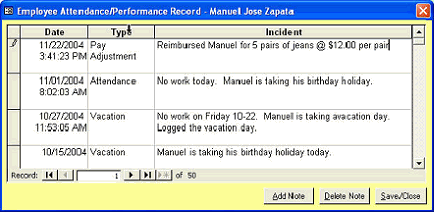
The bottom half of this form contains an area for your personnel or department managers to record time-stamped
events such as attendance problems, performance problems or commendations, or other specific instances and
events. Contemporaneous entry of specific instances can aid in documenting employee performance during pay
increases, unemployment claims, etc. A relatively infinite number of specific instance items can be recorded
here.
This form allows entry and edition
of the selected employee’s specific
instances. You can record any
contemporary data for the selected
employee here. This form is
protected by security, allowing
views by only authorized personnel.
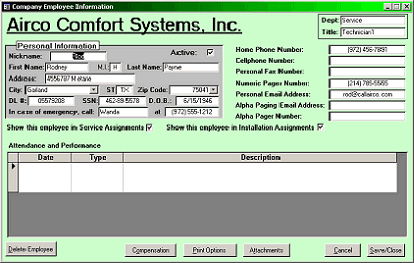
After employees have been entered into the system, you may access the information by clicking the Edit
Employee button on the Setup Employee form.
This form gives the ability to alter, add,
or edit stored employee information. It
also gives the ability to completely delete
the selected employee from the system
(with the proper security).
Using this form, you may also access
compensation information (depending
upon your company’s assigned security
scheme)
Also, you have the ability to store
attachments such as pictures, drawings,
or other documents with this employee
record. (see Attachments elsewhere in
this manual).
You may also change the Active / Inactive as you may desire. Normally, an employee that leaves your company
would be checked Inactive until such time as you deem their records are not longer needed.
Consistent recording and updating of employee information will aid your company manage its human resources
and comply with state and federal laws and regulations should an employee file for unemployment or some other
action.
You must add employees before proceeding to the next HVAC Office customization step, assigning security
clearances to your employees.
|
 |
|