


 |
 |
 |
 |
 |
|
 |
 |

Part 2 – System Customization - 25 -
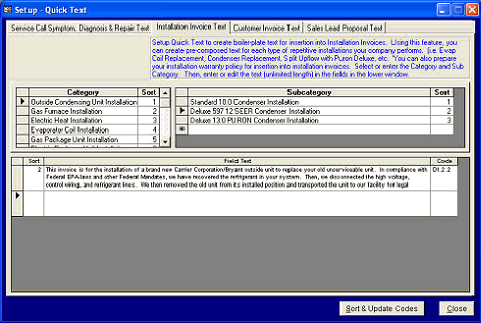
You will be able to create
whole paragraphs or
combinations of paragraphs
as you may desire to
thoroughly explain your
Installations to your
customers in the form of an
invoice for those services.
In this example, a typical
text for a replacement
outside condensing unit is
shown. You may have
several unique texts that
cover the installation of a
Deluxe outside unit, so the
system allows an infinite
number of text insertions
from which to enter and
then choose when creating
the invoice for your
customer.
One user of this system also created Warranty texts for every type of installation Quick Text, so that his
company’s warranty could also be printed on a multi-page invoice. The more you utilize Quick Text, the more
you will devise and enter new text for circumstances that may be repeated by your company. This makes
Installation Invoice creation quick and easy (and can prevent invoices from being submitted to your customers
with errors in grammar and spelling).
To compose Customer Invoice or Sales Proposal texts, simply click the desired tab at the top of the page and
follow the directions in blue type for each scenario.
This concludes the basic setup of Quantrac 2005 for your dealership. You may return to any of the setup categories
at any time to update or modify these entries. Proper system setup and customization will ensure your success using
this program. Each function that utilizes the aforementioned Setup will be fully explained in their individual
sections. For Accounts Receivable setup, see Part 6 of this manual.
|
 |
|