


 |
 |
 |
 |
 |
|
 |
 |
Part 2 – System Customization - 23 -
Setting up City Code Items
This advanced feature of Quantrac’s HVAC Office can aid your installation department comply with the various
peculiarities and interpretations of city code requirements. During normal operating use, you can recall your pre-
entered City Code Items from the Installation form for the particular city of the installation. For instance, when
working an installation in Dallas, click the City Codes button on the installation form. All pre-entered city code
items for Dallas will be displayed.
Using this feature can help your company pass city inspections on the first pass, saving valuable time and
expense.
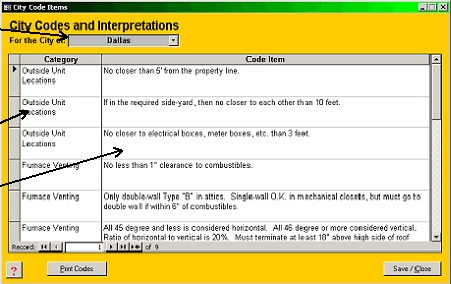
To setup the City Codes in your system, first click Setup|City Codes from the main menu. The following form
will display.
1.
Click the City combo box for
a list of the citys that you
have already entered into
Quantrac. To add cities, go
to the main menu
Setup|Lists. Then, you may
return to this form to add
code items for the new city.
2.
Enter a Category. Be
consistent so the categories
will be easier to organize.
3.
Enter your company’s
interpretation of the code
item for the selected
category.
4.
You may return to this setup
form at any time to add,
delete, or edit Categories
and/or Items.
To use the feature, “City Codes”, see the section “Installations and Installation Management” in Chapter Two.
|
 |
|