


 |
 |
 |
 |
 |
|
 |
 |

Part 2 – System Customization - 22 -
Advanced Features
Setting up Service Help Questions/Prompts
This is another advanced feature of Quantrac 2005 that can aid your service department with questions and/or
prompts that your service call taker might use to facilitate more professional service. The function is available
whenever a new Service Call is initiated. Your Service Manager can enter certain Yes/No questions with
expected answers or call-taking prompts to help your service representative operate smoothly and professionally.
This section of Setup describes the preparation of the feature.
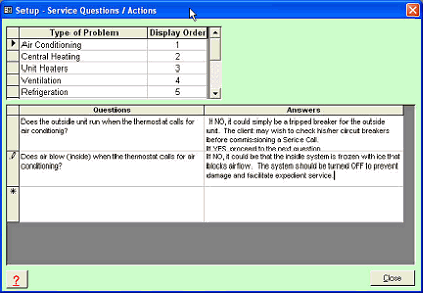
To setup the Service Questions in your system, first click Setup|Service Questions from the main menu. The
following form will display:
First, the Type of Problem should be
entered. A list of types is included with
Quantrac 2005 for your convenience
and to aid in the setup.
Next, enter the questions that your
representative should ask a service call
client. For simplicity, attempt to make
all questions answerable with Yes or
No.
Lastly, enter the expected answers and
the action that should be taken.
You can enter as many Types,
Questions, and Answers that you wish.
Remember to keep it simple; so that
your representative and the client can
gain useful information that will aid during the recording of the Service Call and the subsequent actions that your
company will take to remedy the situation.
|
 |
|