


 |
 |
 |
 |
 |
|
 |
 |

Part 2 – System Customization - 21 -
Setting up Installation Templates
Many installation jobs that your company undertakes are repetitive in nature. (i.e. you may complete many 3-ton
upflow system equipment change-outs in any given year) Quantrac 2005 has the ability to calculate the cost of
any job, item by item. The system will also create pick lists (a list of all items needed to do the job) for your
installation crews. To reduce the time required to create these job costs and pick lists, you can create a template
for each type of installation. Then, you may copy the pre-entered data into any installation, eliminating the time
consuming job of repetitive data entry. For instance, you could create a template for a 3-ton upflow system
equipment change-out job; and use it many times during the year…each time you have a 3-ton change-out to
schedule and cost.
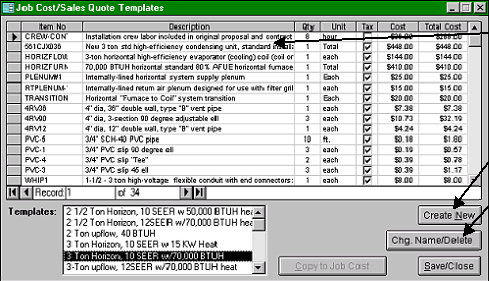
To access the installation template setup form, click Setup|Installation Templates on the menu bar.
This form is an example of an installation template for a 3-Ton A/C, horizontal furnace equipment change-out.
Notice that all items that might be required are listed here, along with their tax status and actual cost. (34 items
are listed here, but only the first fifteen are shown…you may scroll down on your system to see the items hidden
from view). Also notice that there are several other templates available. You may select a template for viewing
or editing from the Templates window at the bottom of the form.
Double-click on any line to
display your list of In-
voice Items, from which
you can select items for
this template.
Click the Create New
button to create a new
template.
If you wish to change the
name of an existing tem-
plate or delete a template,
select the template from
the list and click this
button.
The installation template feature of Quantrac 2005 is especially useful for HVAC companies that do tract homes.
You will be able to create a pick list for each new home installation in a matter of seconds, based upon your
predetermined list of items stored in a Template. The job-costing feature will also help to calculate your actual
cost of each installation.
|
 |
|