


 |
 |
 |
 |
 |
|
 |
 |
Part 2 – System Customization - 19 -
Installations and Installation Management
Installation Status/Processing Setup
In order to help you organize your installation jobs (new construction, remodel, equipment change-out, or non-
equipment installations such as duct additions, etc.) Quantrac 2005 includes a form of customized tabular lists of
your installations in progress. You may label these tabs any way you wish. Then, upon assigning a ‘status’ for
each installation, the computer will sort your installations into the proper tab. In addition, you may also view all
installation, unsorted, if you desire.
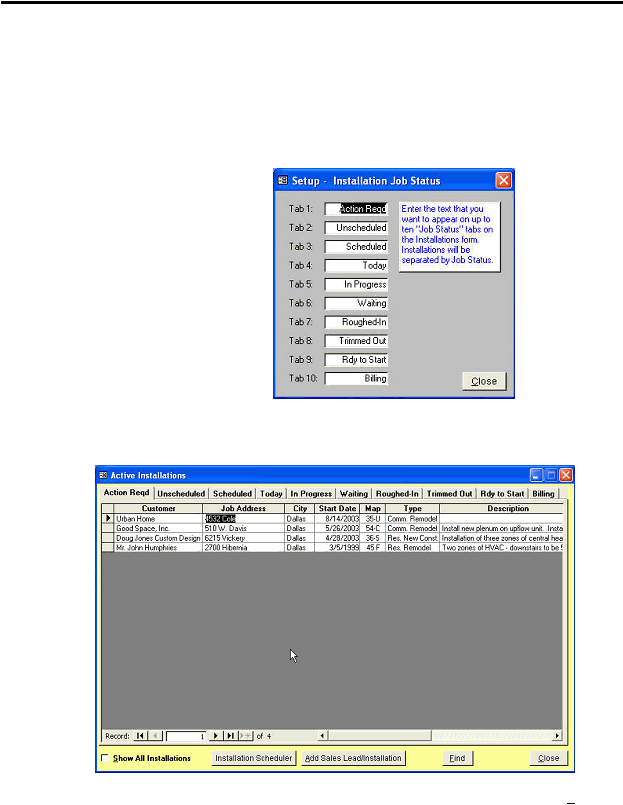
In order to use this feature of Quantrac 2005, you must first setup a maximum of eight status and tab labels. Click
on Setup|Installation Status on the menu bar to display this form.
To customize your installation status tabs,
simply enter the title of the tab in the fields
provided. You may enter 1 – 10 status tabs.
These status tabs have been pre-entered for
your convenience. You may delete, edit, or
change them as you wish.
See ‘Installations’ in Part 3 of this manual
for a description of the use of the status tabs.
These tabs are set up by “installation status”.
You may wish to create different job status
tabs (i.e., by installation type, listing A.O.R.,
Commercial, Residential, Reconstruction,
etc.) If you only enter one tab, the
installation will not be sorted. You may
enter up to eight status tabs. The system will format your installation calls screen accordingly.
This is an example of a list of installations, sorted by the pre-programmed tabs:
To change tabs, click the mouse on the selected tab. To show all installations (unsorted) click the Show All
Installations box at the bottom of the form.
|
 |
|