


 |
 |
 |
 |
 |
|
 |
 |


Part 2 – System Customization - 16 -
Configuring Other Company Parameters
1.
Click “Setup
Other” on the
menu bar to display this form,
which contains three settings
that the system uses to perform
various functions.
2.
We recommend that you do not
change these parameters when
you first install Quantrac 2005
since they are appropriate for
most companies. You may,
however, decide to change them
later.
3.
When finished, click the Close
button.
Setting the Current Date and Time
1.
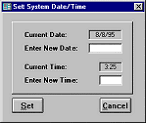
Click “Setup
Set Date/Time” on the menu bar to display this form.
2.
Quantrac 2005 is a “real time” operating system. It is very important that the
computer’s built-in clock/calendar is accurate. Many functions in the system rely on
this information. Please verify that the date and time are correct. If not, make the
necessary changes and click the “Set” button. (The current date is displayed at the top
of the Main Control form.)
Note: If you are using networked workstations, it is also very important that all systems on the network are set to
the same date, and relatively close to the same time. Since this system operates in “real time” (time stamps user
actions), unusual problems can arise if computers on the network are set to different dates/times.
This button
is used when a computer on the
network running HVAC Office has abnormally
terminated the program. Before restarting that
computer, click Reset Logins on any computer .
1
See “System Security” in Appendix E.
|
 |
|