


 |
 |
 |
 |
 |
|
 |
 |
Part 2 – System Customization - 15 -
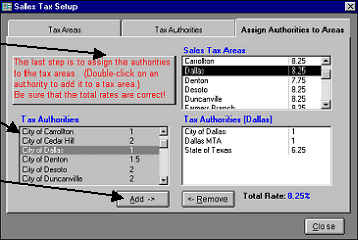
Each sales tax area that you entered in step 2
above will be listed in the “Sales Tax Areas”
window.
4.
Select the first Sales Tax Area in the list by
clicking on it.
5.
With the Sales Tax Area selected from
above, choose a Tax Authority for that area
from the list of Tax Authorities by clicking
on the appropriate line.
6.
Click the “Add->” button to add the selected
Tax Authority to the selected Sales Tax Area.
7.
Continue to select Tax Authorities and to add
them to the list until all Tax Authorities for the
selected Sales Tax Area are listed. To remove a
Tax Authority, click on it and then click the Remove button.
8.
Proceed to the next Sales Tax Area and repeat steps 7 through 9 above. Continue until all areas have been
completed.
Quantrac 2005 includes Sales Tax reports that sort the taxes collected into their proper authorities to aid in reporting sales tax
to the state authority. (See Reports)
|
 |
|