


 |
 |
 |
 |
 |
|
 |
 |

Part 2 – System Customization - 14 -
Sales Tax Setup
Introduction
Quantrac 2005 contains an automatic sales tax computation and reporting function to help companies comply
with their state’s sales tax reporting. When properly set up, the system will compute the sales taxes payable based
upon the city or area in which service or installations are done. Multiple sales tax authorities may be combined
for any area, per your local tax codes, to arrive at the correct sales tax percentage and amount to collect and
report. For instance, the sales tax for Garland, Texas includes separate taxes from three separate taxing
authorities (City of Garland: 1%, State of Texas: 6.25%, and Dallas Transit Authority: 1%, for a total tax rate of
8.25%. The secretary of state requires tax reporting for each taxing authority for revenue produced in each
locality.
If a jobsite is “tax exempt,” you may mark it as such in the Jobsite form. Any service or installations done at that
jobsite will automatically be marked as tax exempt. Otherwise, the tax will be computed at the tax rate for that
area.
Carefully follow these steps to set up your sales taxes in Quantrac 2005.
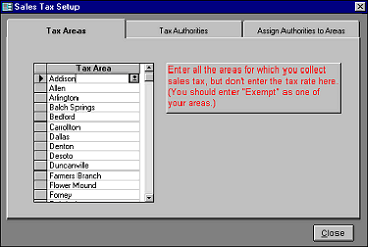
1.
Click “Setup|Sales Tax” to display this
form. Click the “Tax Areas” tab if it is
not already selected.
2.
In the “Tax Areas” list, enter every city
and unincorporated area in which you do
taxable business. A drop-down list will
include all cities that you previously
entered. The system will automatically
alphabetize your Tax Area list.
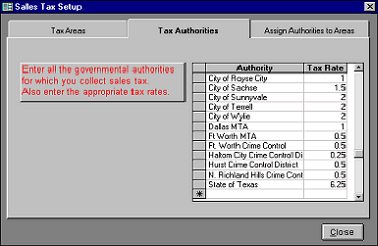
Click on the “Tax Authorities” tab.
3. Enter all of the governmental taxing
authorities that you encounter and their
associated tax rates. Most cities have a
taxing authority, as well as mass transit
authorities, crime control districts, and other
special purpose taxes. Contact your state
treasurer for this information. In Texas, as
in most other states, a book of tax authorities is
published to aid businesses.
Click the “Assign Authorities to Areas” tab.
|
 |
|