


 |
 |
 |
 |
 |
|
 |
 |
Part 2 – System Customization - 12 -
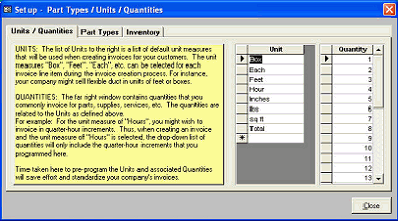
Clicking the “Setup Details” button will cause the system to display this form:
The instructions for entering these customization parameters are included on the form. You may click on the tabs
at the top of the form (Units/Quantities, Part Types, Inventory) to switch between the functions and their
explanations.
The Inventory (3rd
tab) will be explained fully in the Setup Inventory section in Part Three (Basic Operation) of
this manual.
Invoice Items Definitions:
These definitions apply to the (Invoice Items section) of the Invoice Item Entry form (previous page):
Sort: As noted above, this (optional) field allows you to designate the order of the invoice item lists. When
entering items into invoices, sales quotes and jobs costs, you will want your most frequently used invoice items at
the top of the list.
Item No.: A unique number for each invoice item. This number will appear on the invoice, sales quote or job
cost.
Description: A description of the item. This field will appear on the invoice, sales quote or job cost.
Price: The retail amount that you normally charge for the item. This will appear on the invoice, sales quote or job
cost.
Unit: An optional field that appears on the invoice, sales quote or job cost, and describes how the invoice item is
measured. For example, for refrigerants, the unit would be “Lb.” For labor, it would be “Hour”.
Cost: The wholesale amount that you pay for the item. This field is optional and is used to calculate job costs.
Tax: Indicates whether the invoice item is usually taxable. You can change this denotation on the invoice, sales
quote or job cost on an item-by-item basis.
Type: Indicates whether the item is a part, labor rate, flat rate, etc. This information is used to categorize items
for system reports. (To make any changes to this list, go to Setup - Lists - Invoice Item Types).
Manuf.: The manufacturer of the product. This field is optional and will not appear on the invoice, sales quote or
job cost. This information is used in system reports.
Manuf. No.: The manufacturer’s product number. This field is optional and will not appear on the invoice, sales
quote or job cost. This information is used in system reports.
Supplier: The supplier of the product. This field is optional and will not appear on the invoice, sales quote or job
cost. This information is used in system reports.
|
 |
|